
⚡ Launch discount — first 100 licences: use code PFX20 and pay only €29 instead of €49
PDF stamp software for Windows
Add a Stamp to a PDF — Not a Watermark, a Real Stamp
A stamp is a visible image — Paid, Approved, Reviewed, Confidential, or your own company stamp — placed precisely on the correct position on the PDF page. PDFixer does exactly that, locally on Windows, without uploading the document.
✓ 14-day free trial · ✓ One payment, 3-year licence: €49 excl. VAT · ✓ No subscription · ✓ No auto-renewal
4.7 ★★★★★ Made by the team behind Fabreasy · 38 reviews on Capterra · used by over 1,000+ professionals
Last updated: July 2026 · Tested on Windows 10 and Windows 11
Stamp ≠ watermark
What is the difference between a PDF stamp and a watermark?
A stamp is a precise, visible marking on a specific position on a specific page — like a rubber stamp on paper. A watermark is a faded text or image repeated diagonally across every page. They are different tools for different purposes.
Search for “pdf stamp” or “add stamp to pdf” and the results are dominated by watermark tools: PDF24, Smallpdf, Sejda, iLovePDF all open a watermark editor when you click through. If you need Paid on an invoice, Approved on a purchase order or your company stamp on a contract — at the right size, in the right corner, without covering the rest of the content — you need a stamp tool. PDFixer is built for exactly this workflow.
At a glance
PDFixer as PDF stamp software
| Product | Fabreasy PDFixer |
| What it places | Visible image stamps on a chosen position — not page-wide watermarks |
| Stamp formats | PNG, JPG, BMP — with built-in background removal |
| Operating system | Windows 10 and Windows 11 |
| Documents uploaded | Never — all processing happens locally on your PC |
| Price | €49 excl. VAT, one-time payment, 3-year licence, all updates included |
| Free trial | 14 days, full functionality, via the Microsoft Store |
| Developer | Fabreasy (the Netherlands) — rated 4.7/5 on Capterra (38 reviews), used by 1,000+ professionals |
Step by step
How do you add a stamp to a PDF?
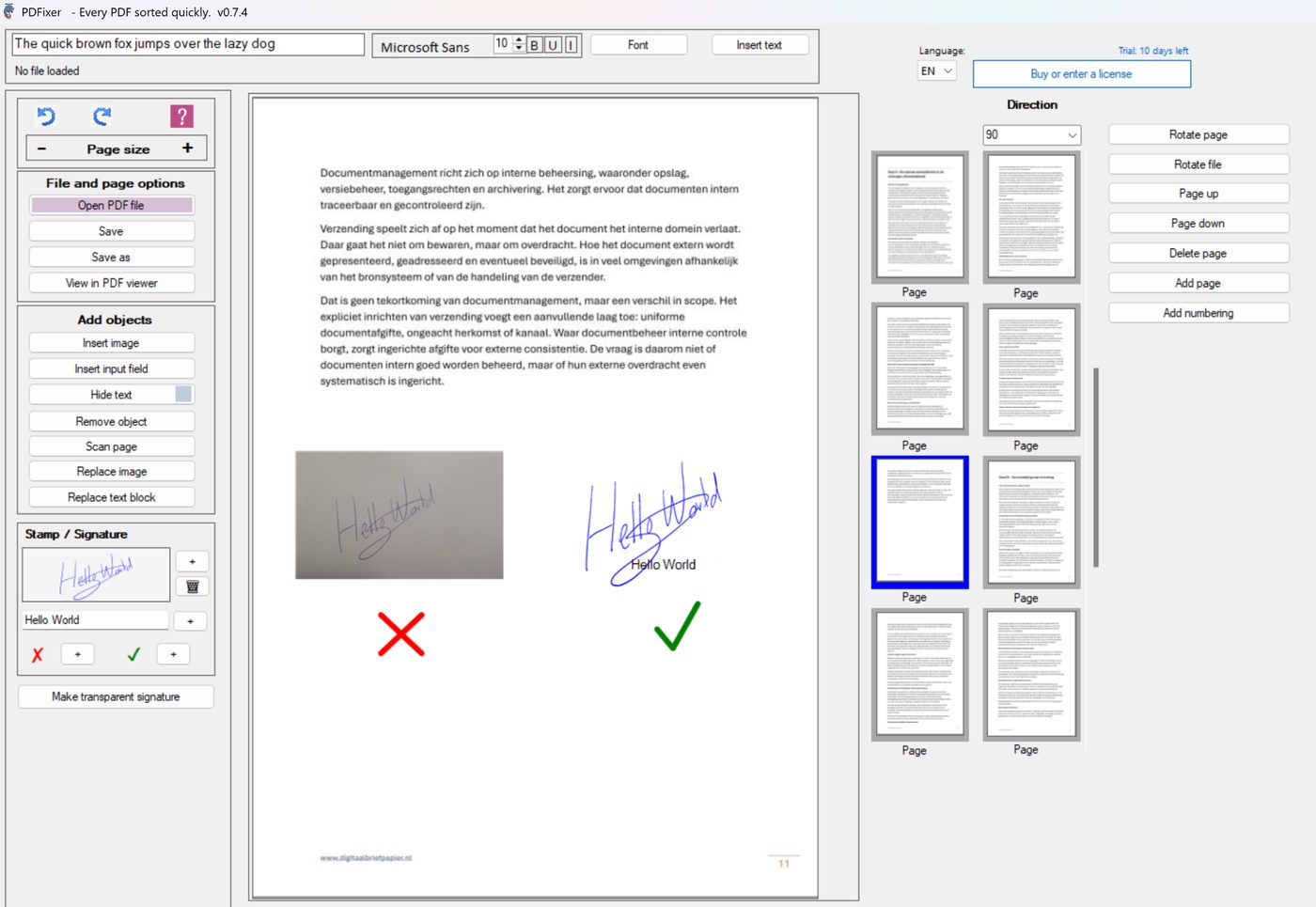
Quick answer: open the PDF in PDFixer, go to the Stamp / Signature panel, import or select your stamp image, position it on the page, save locally.
- Open the PDF in PDFixer on Windows.
- Go to the Stamp / Signature panel.
- Import your stamp image — PNG, JPG or BMP. If the stamp image has a white background, use the Make transparent signature tool to remove it.
- Save the stamp as a preset for reuse on future PDFs.
- Place the stamp on the correct page. Resize and position it precisely.
- Save the PDF locally. Nothing is uploaded.
Once the stamp preset is saved, adding it to the next PDF takes under thirty seconds. The same workflow applies to signatures, approval marks and company logos.
Stamp types
Which stamps can you add to a PDF?
| Stamp type | Typical use |
|---|---|
| Paid | Mark invoices and payment confirmations |
| Approved | Internal approval workflows, purchase orders |
| Reviewed | Quality checks, audit documents |
| Confidential | Client documents, personnel files, contracts |
| Draft | Documents not yet final, for review only |
| Company stamp | Official company marking on outgoing documents |
| Custom image | Any PNG, JPG or BMP image as a stamp preset |
Comparison
How does PDFixer compare to online watermark tools?
Most tools that rank for “pdf stamp” are actually watermark tools. Here is the practical difference for a real office workflow:
| Feature | Online watermark tools | PDFixer (Windows) |
|---|---|---|
| What it places on the page | Faded diagonal text across all pages | ✓ Precise image stamp on chosen position |
| Document uploaded to server | Yes — required | ✓ Never — stays on your PC |
| Reusable stamp preset | No — recreate each time | ✓ Saved permanently in panel |
| Background removal for stamp image | Not available | ✓ Built-in — one slider |
| Also adds signatures and approval marks | No | ✓ Same workflow |
| Price | Free with ads or freemium | ✓ €49 one-time, 3-year licence |
Documents that get stamped — invoices, contracts, approval forms, personnel files, audit documents — are exactly the documents that should not travel to a third-party server. PDFixer processes everything on your Windows PC.
About the developer
PDFixer is made by the team behind Fabreasy — Windows PDF software used by 1,000+ professionals.
4.7 ★★★★★ Fabreasy on Capterra · 38 reviews
Ease of use: 4.6 Support: 4.7 Value for money: 4.8 Recommends: 90%
FAQ
PDF stamp questions
Get started
Add a stamp to your PDF — locally, in seconds
Download PDFixer from the Microsoft Store and stamp your first PDF within two minutes.
✓ 14-day free trial · ✓ One payment, 3-year licence: €49 excl. VAT · ✓ No subscription · ✓ No auto-renewal