
LOCAL PDF EDITOR FOR WINDOWS
Add a signature to a PDF. Without the white box.
PDFixer lets you add a signature to a PDF without uploading the document. Turn a photo or webcam capture into a clean transparent signature, place it exactly where it belongs and save the PDF locally.
If the PDF itself still needs work, edit existing text and pages, apply letterhead or digitally sign it with your own certificate.
Select the signature, position it, check the PDF and save.
Windows 10 and 11 · no registration · documents stay on your PC
€49 excl. VAT · one payment for three years · no automatic renewal
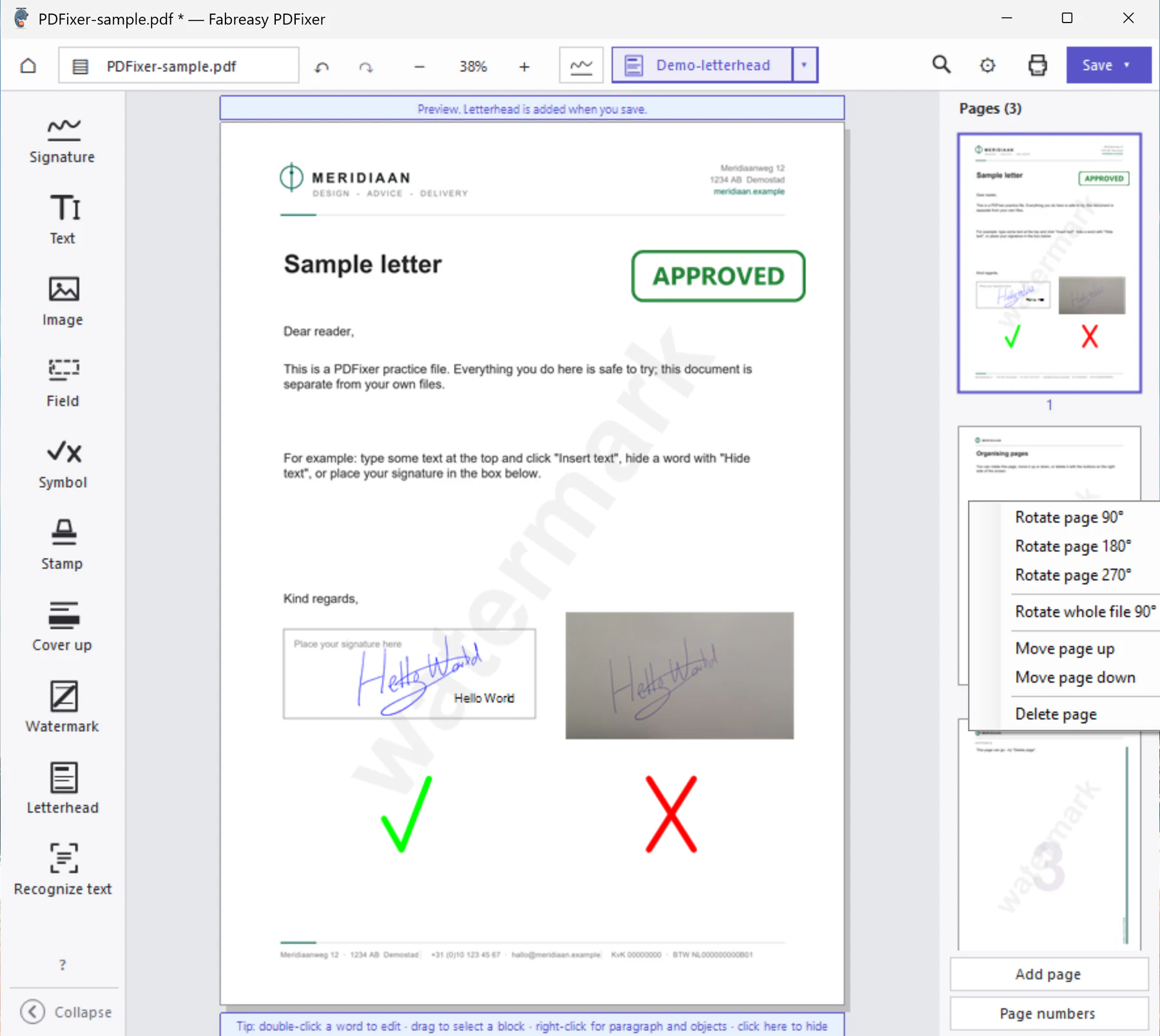
Click the image to open the complete PDFixer screen.
Trust with clear attribution: the team behind PDFixer also develops Fabreasy PDF Creator. On Capterra, 38 verified users rate that product 4.7 out of 5 stars.
What is Fabreasy PDFixer?
Fabreasy PDFixer is local Windows software for editing and signing PDF files. The essential facts at a glance:
| Product | Fabreasy PDFixer |
|---|---|
| Category | PDF editor and software for visible and digital signatures (desktop application) |
| Operating system | Windows 10 and Windows 11, 64 bit |
| Document processing | Local on your PC; documents are not uploaded |
| PDF support | Reads and writes PDF 2.0; optional Brotli compression |
| Editing | Edit text and images; insert, rotate, move and remove pages; add symbols, stamps and letterhead |
| Visible signature | Create a transparent signature from a photo or webcam image and place it in the PDF |
| Digital signature | Sign with a compatible PDF certificate |
| Installation options | Microsoft Store, Portable ZIP or MSIX |
| Free trial | 14 days with full functionality |
| Licence | €49 excl. VAT; one payment for a three year licence, including updates |
| Subscription | None; no automatic renewal |
| Developer | Fabreasy, the Netherlands. The team behind Fabreasy PDF Creator, rated 4.7 out of 5 on Capterra based on 38 verified reviews |
START WITH THE JOB TO BE DONE
What do you need to do with this PDF?
Start with the result you need. PDFixer handles each task in the same local Windows application.
Add a visible signature
Create a transparent signature from a photo or webcam, then add text, ticks or crosses when required.
Digitally sign the PDF
Use a compatible personal certificate so identity and changes made after signing can be checked.
Correct the PDF first
Edit existing text, recognise scans with OCR, change pages and apply letterhead before you sign.
VISIBLE SIGNATURE
How to add a signature to a PDF in three steps
A PDF is not a sheet of paper. A photograph of a signature often includes a white or grey background. PDFixer removes that background so only the handwriting remains visible.
- Take or select a photo.
Use your webcam or open a photo taken with your phone. - Remove the background.
Crop the image, clean up the paper background and adjust the colour if needed. - Place and save.
Drag the signature into position and add a name, date, tick or cross if required.
Prepare it once, then reuse it. The transparent signature is stored locally as a reusable item.
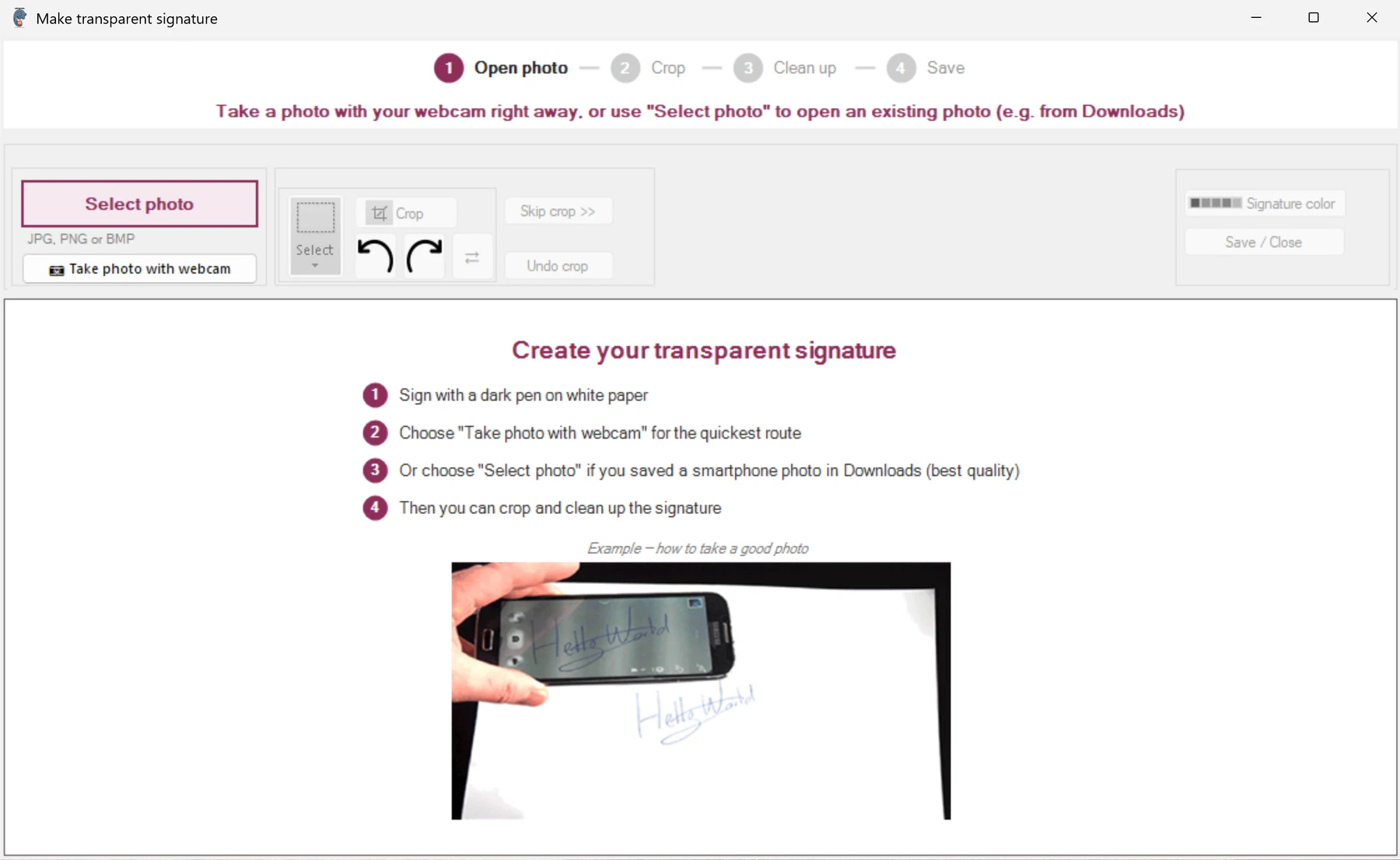
Photo or webcam · crop · remove background · save locally
MORE THAN A SIGNATURE TOOL
If the PDF is not ready, correct it first
There is no need to switch between a collection of small utilities. Open, correct, sign and save the document in PDFixer.
Edit existing text
Double click a word to change it. Keep control of the typeface, weight, size and colour while the rest of the line moves with the edit.
Correct the page order
Insert pages from another PDF, rotate, move or remove them. Multiple undo steps let you reverse changes.
Recognise scans with OCR
Create a searchable and editable basis from Dutch, English, German and French scanned documents.
Add text and marks
Place text, ticks, crosses, symbols, stamps, images, form fields and cover up areas exactly where they are needed.
Apply letterhead
Use reusable letterhead sets with layers and rules for first, following and final pages.
Digitally sign
Sign when saving with a compatible personal certificate, then verify the result in a PDF reader.
Read and write PDF 2.0
Process current PDF structures locally. Brotli compression is available as a deliberately selected beta option.
Replace or remove objects
Replace images, move objects or select a paragraph or block and remove it in one action.
Work locally on Windows
Document processing takes place on your PC. Internet may be needed for licensing, updates, timestamps or certificate verification.
TWO WAYS TO SIGN
A visible signature and a digital signature are not the same
Visible handwritten signature
This is an image placed on the PDF page. It is useful when a recipient expects to see a recognisable signature, initials, a name or a tick in the document.
Digital signature using your certificate
This is cryptographic proof. With a suitable certificate, a reader can check who signed and whether the PDF was changed afterwards. PDFixer supports compatible personal certificates, including suitable Certum certificates.
The handwritten signature remains visible on the page while the digital signature provides technical verification.
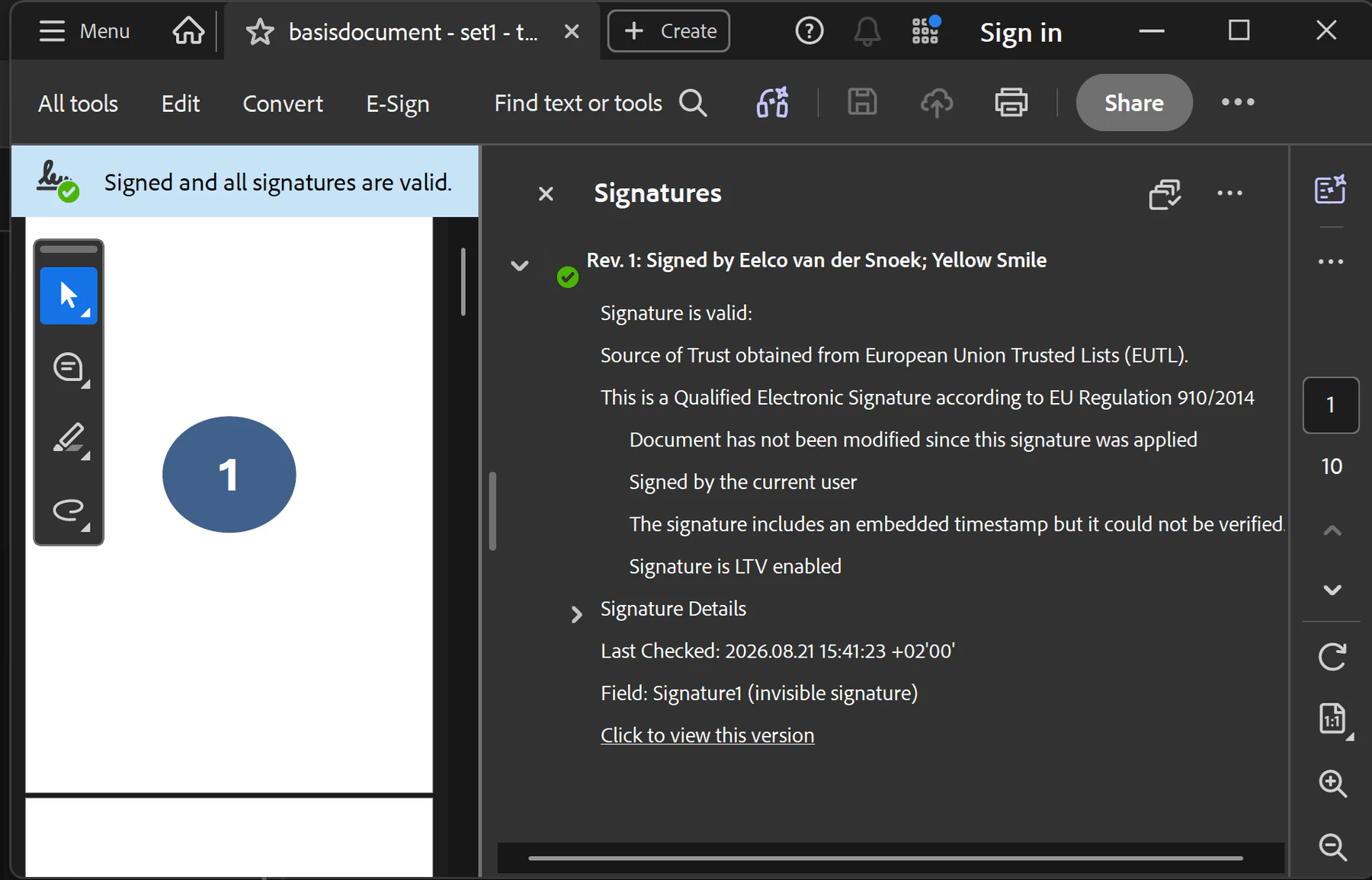
Example: Acrobat reports that the signature is valid and that the document has not been changed since signing. The exact status depends on the certificate used.
LETTERHEAD AS A FINISHING STEP
Consistent letterhead, regardless of where the PDF was created
Reports, quotations and contracts do not always come from the same application. A letterhead set lets you apply your fixed design above or below the existing PDF content.
- up to five paper layers in each set
- separate rules for first, following and final pages
- multi page front and back matter
- reusable sets for recurring document types
The result stays consistent, regardless of which system produced the original PDF.
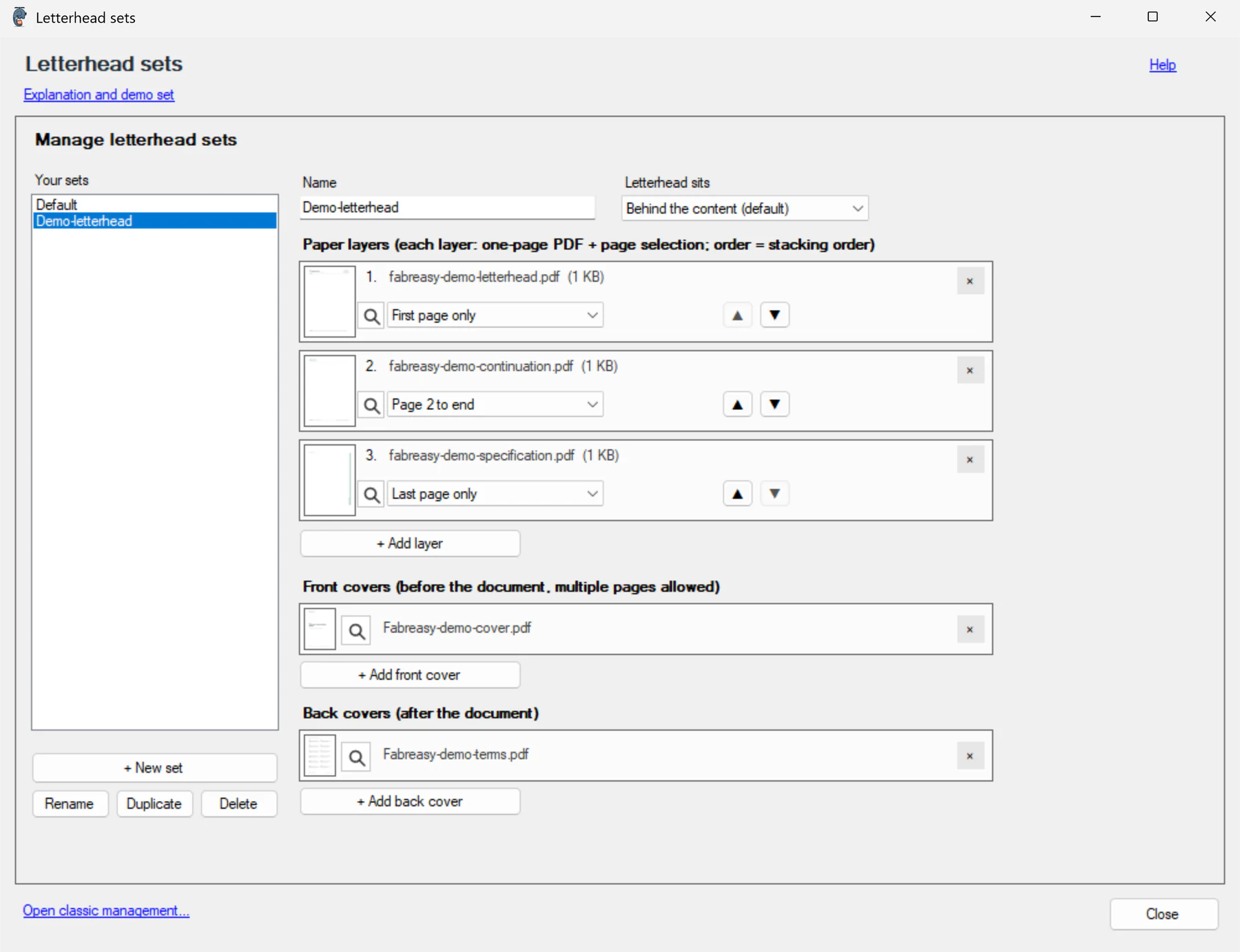
Letterhead sets with layers, page rules and multi page front and back matter
INSTALLATION OPTIONS
Choose the installation route that fits your situation
The Microsoft Store is recommended for most users. Portable ZIP and MSIX are available for special or managed environments.
Use all features for 14 days. Afterwards, you decide whether to buy a licence for €49 excl. VAT. This is one payment for three years, with no subscription or automatic renewal.
Microsoft Store · Recommended
The fastest and safest start. Windows shows the verified publisher, installs the application and manages updates. The complete 14 day trial is included.
Portable ZIP
Run PDFixer without a regular installation, for example from a USB drive or in a controlled test environment. Updates are installed manually.
MSIX for managed deployment
For administrators who distribute PDFixer over a network or through an MDM solution. Suitable for central deployment and prepared settings.
LOCAL, CURRENT AND TRANSPARENT
Clear technical facts instead of broad promises
Documents are processed locally
PDF files, scans, signatures and letterhead are processed on your Windows PC. Internet may be required for licensing, updates, timestamps or certificate checks, but editing does not require a document upload.
PDF 2.0 and Brotli
PDFixer reads PDF 2.0 files using Brotli compression and can write Brotli as a beta option. Use it only when the software used by your recipients supports the format.
Direct product support
For help with installation, certificates or a specific document workflow, contact the Fabreasy team at pdfixer@fabreasy.com.
FREQUENTLY ASKED QUESTIONS
Answers before you download
How do I add a signature to a PDF?
Open the PDF in PDFixer, select a stored signature or create one from a photo or webcam capture. Position and resize it on the page, then save the PDF locally.
How do I remove the white background from a signature?
The built in assistant crops the photo and removes the paper background. Only the handwriting remains, so the signature sits cleanly over the PDF page.
What is the difference between a visible signature and a digital signature?
A visible signature is an image on the page. A digital signature uses a certificate so identity and changes made after signing can be checked. PDFixer can use both in the same document.
Can PDFixer digitally sign with a Certum certificate?
PDFixer can use compatible personal PDF signing certificates, including suitable Certum certificates, when they are available through Windows or the relevant card or token. Whether the result is a qualified electronic signature depends on the specific certificate, signing device and trust chain.
Is PDFixer a platform for requesting signatures from other people?
No. PDFixer does not send signature requests or require a portal for other signers. It is a local Windows application for editing PDFs, adding visible signatures and digitally signing with your own certificate.
Are my PDF files uploaded?
Document processing takes place locally. Internet may be needed for licensing, updates, timestamps or certificate verification. The PDF itself does not need to be uploaded to an editing cloud.
Can PDFixer edit existing text and scanned PDFs?
Yes. Existing words can be edited, while OCR recognises Dutch, English, German and French scans. You can also insert, rotate, move and remove pages.
What do PDF 2.0 and Brotli compression mean?
PDF 2.0 is the current PDF specification. Brotli can compress certain data efficiently. PDFixer reads Brotli and can write it as a beta option. Because not every PDF reader supports Brotli yet, use it only for compatible recipients.
What does PDFixer cost after the trial?
You can use the complete version free for 14 days. Afterwards, you decide whether to buy it. A licence costs €49 excl. VAT, is paid once and remains valid for three years. There is no subscription or automatic renewal.
Which versions of Windows are supported?
PDFixer requires 64 bit Windows 10 or Windows 11 on an Intel or AMD processor. ARM processors are not supported.
Add a signature to a PDF and correct the document at the same time.
Try the complete PDFixer application for 14 days on your own Windows PC. Afterwards, you decide whether to buy it.
Microsoft Store · no registration · documents stay local · support: pdfixer@fabreasy.com