
⚡ Launch discount first 100 licences: code PFX20 and pay only €29 instead of €49 · Download from the Microsoft Store
Transparent Signature Maker
Create a Transparent Signature PNG
Fabreasy PDFixer converts a photo of your handwritten signature into a transparent PNG on your Windows PC — background removed in seconds, ready for PDF documents, Word, quotations and invoices. Nothing is uploaded.
✓ 14-day free trial · ✓ One payment, 3-year licence: €49 excl. VAT · ✓ No subscription · ✓ No auto-renewal
4.7 ★★★★★ Made by the team behind Fabreasy · 38 reviews on Capterra · used by over 1,000+ professionals
Last updated: July 2026 · Tested on Windows 10 and Windows 11
Quick answer
How do you turn a signature photo into a transparent PNG?
Import a photo of your handwritten signature into PDFixer on Windows, crop it, move the Remove background slider until only the handwriting remains, and save. The result is a clean transparent signature PNG — stored as a reusable preset and usable in PDF documents, Word, Outlook and any application that accepts transparent images.
No cloud upload. No online editor. No account required. The photo never leaves your PC.
At a glance
What is the PDFixer transparent signature maker?
The transparent signature maker is a core feature of Fabreasy PDFixer, local Windows PDF software. The key facts:
| Product | Fabreasy PDFixer |
| Input | JPG or PNG — a photo or scan of your handwritten signature |
| Output | Transparent PNG, saved as a reusable preset |
| Operating system | Windows 10 and Windows 11 |
| Photo uploaded | Never — all processing happens locally on your PC |
| Price | €49 excl. VAT, one-time payment, 3-year licence, all updates included |
| Free trial | 14 days, full functionality, via the Microsoft Store |
| Developer | Fabreasy (the Netherlands) — rated 4.7/5 on Capterra (38 reviews), used by 1,000+ professionals |
The problem
Why can’t you use a signature photo directly?
A photo of your signature may look fine on paper. In a PDF document, Word file or invoice, it creates problems immediately. Most signature photos have a white background, shadows and paper texture — which makes them impossible to place cleanly on any document.
The most common problems:
✗ White background ✗ Shadows and noise ✗ Paper texture ✗ Not usable in documents
To use your signature in PDF documents, Word files or business documents, you need a transparent signature PNG — not a photo.
Step by step
Make a transparent signature in 6 steps
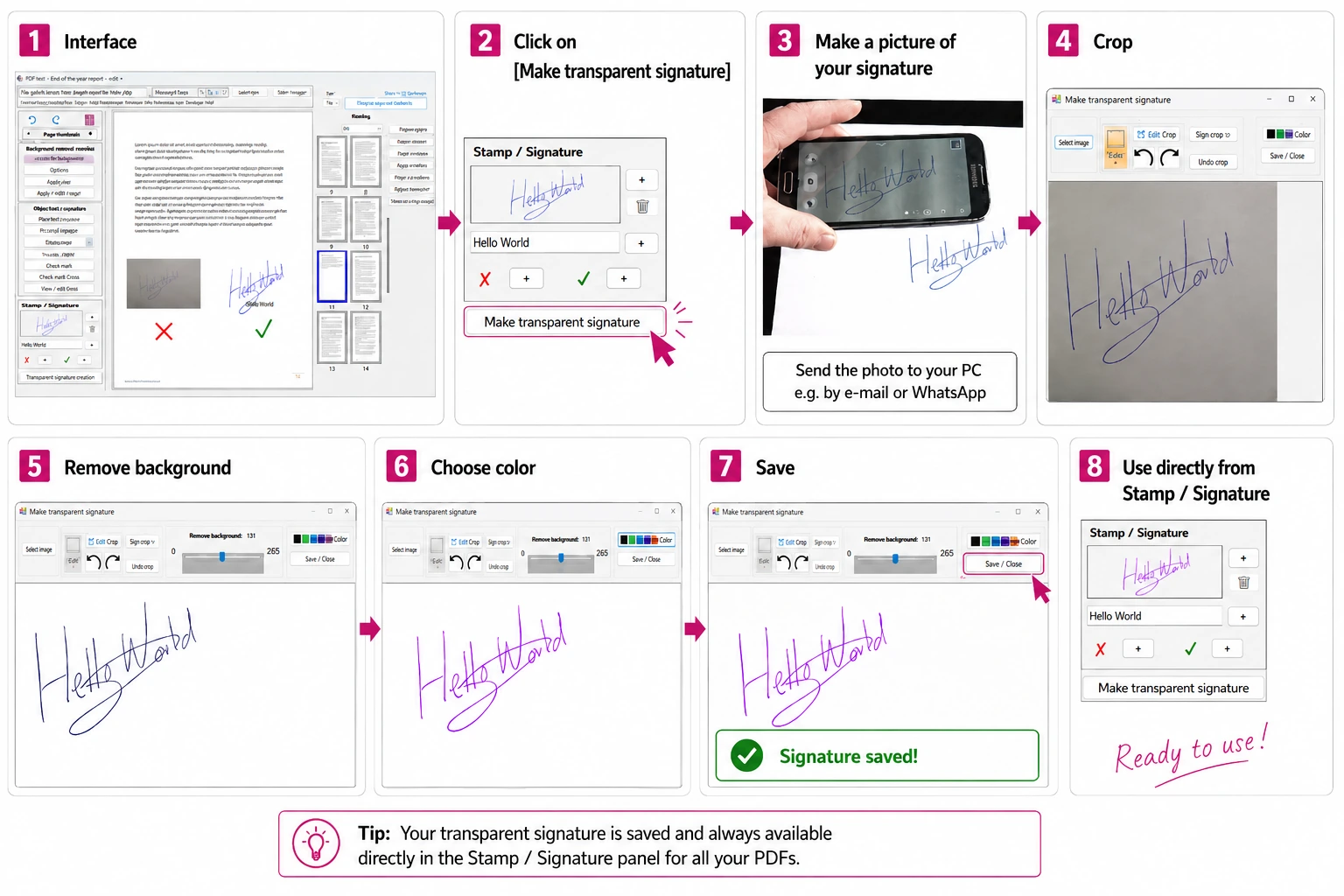
- Write your signature on white paper and photograph it with your phone. Send the photo to your PC, for example by e-mail or WhatsApp.
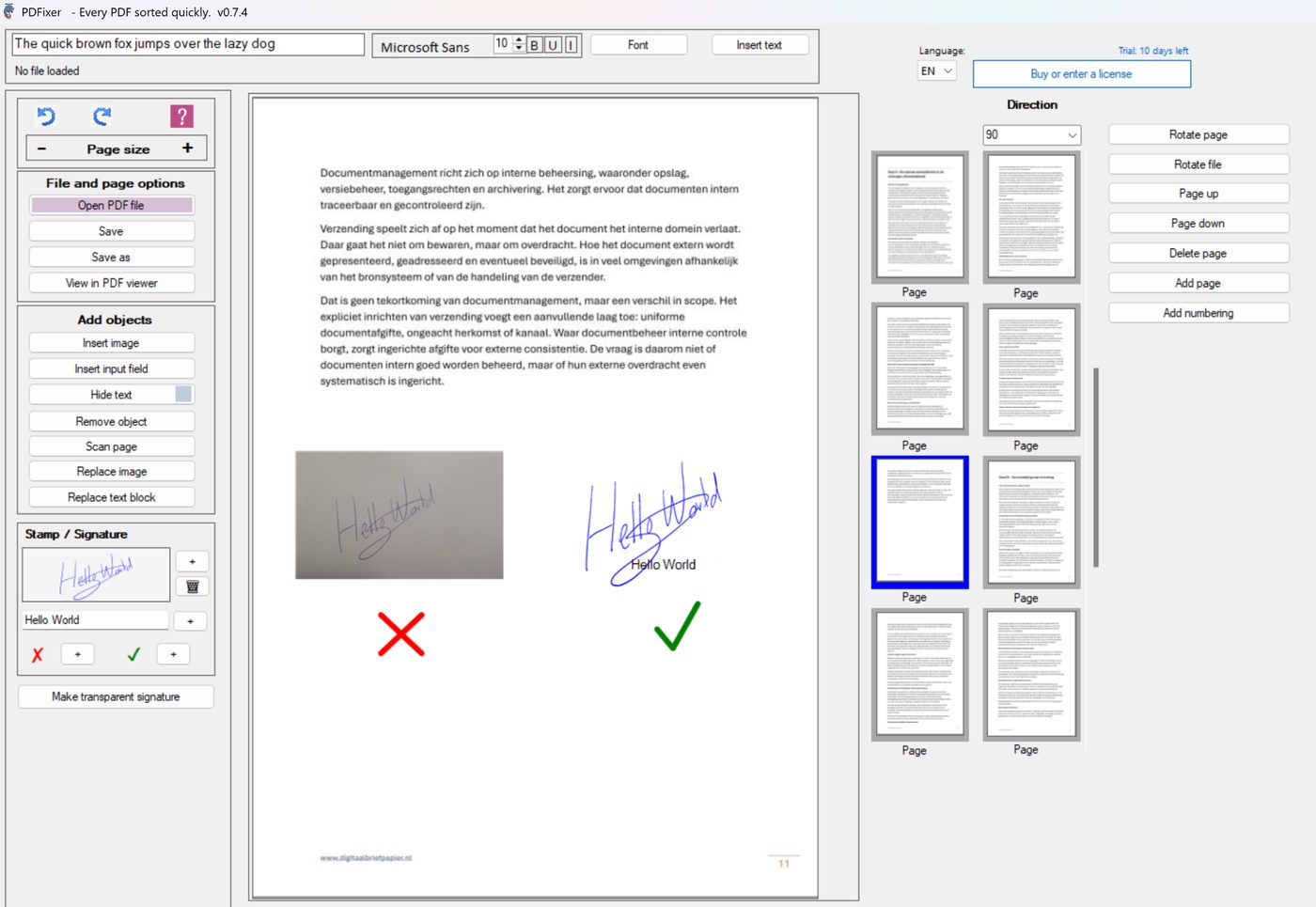
- Open PDFixer and click Make transparent signature in the Stamp / Signature panel.
- Import the photo (JPG or PNG) and crop it to the signature.
- Move the Remove background slider until only the handwriting remains — the paper, shadows and texture disappear.
- Optionally choose a different ink colour.
- Click Save — your transparent signature PNG is stored as a reusable preset.
You only do this once. The preset stays available for every future PDF, Word document or e-mail signature.
Before & after
What changes when the background is removed?
✓ 14-day free trial ✓ Runs locally on Windows
Digital signature PNG
Is a transparent signature PNG a digital signature?
In everyday language, yes: it is a digital version of your handwritten signature. When people search for a “digital signature PNG” or a “digital signature converter”, they almost always mean this — a clean, transparent image of their real handwriting that they can place on documents. That is exactly what PDFixer produces, from a JPG or PNG photo.
In the legal-technical sense, no. A certified digital signature uses a cryptographic certificate and identity verification (DocuSign, Adobe Sign, eIDAS-qualified signatures). An image file can never be that, whatever tool you use. For offers, forms, approvals and everyday correspondence, the visible signature PNG is what you need; for legally binding workflows requiring verified identity, use a certified e-signing platform.
What is a scanned signature? A scanned signature is simply an image of a handwritten signature captured with a scanner or phone camera. Raw scans keep the paper background, which is why they look wrong on documents. Converting the scan to a transparent PNG — what this tool does — is the step that makes a scanned signature usable.
Why PDFixer is different
Why make your signature PNG locally instead of online?
Most online signature tools require you to upload your image to their servers. Your signature is exactly the kind of image you do not want on a third-party server — it is what makes documents look authorised. PDFixer runs entirely on your Windows computer; nothing leaves your machine.
| Online tools | PDFixer |
|---|---|
| ✗ Upload your signature to a server | ✓ Runs locally on Windows |
| ✗ Account required | ✓ No account required |
| ✗ Cloud processing | ✓ No cloud — fully offline after install |
| ✗ Often subscription-based | ✓ One payment. 3-year licence. |
| ✗ Depends on internet connection | ✓ Vetted install via the Microsoft Store |
More than just a transparent signature
What else can PDFixer do?
Once you have created your transparent signature PNG, PDFixer lets you add it to PDF documents and do more. No Adobe. No online upload. No subscription.
| Add signatures to PDFsInsert your transparent signature PNG directly into PDF documents. Position it exactly where it belongs. | Add names, text and imagesPlace your name, text, logo, signature or stamp anywhere on the PDF. Choose font, size and position precisely. | Add checkmarks and crossesPlace clear approval marks, checkmarks and crosses on PDF documents before saving or sending. |
| Rotate and reorder pagesFix sideways pages. Move pages up or down. Rotate one page or the entire file. | Add page numbersAutomatic page numbering anywhere. Choose position, font and starting number. | Stamp and signatureAdd a scanned signature or stamp to any page. Position precisely. Save and send. |
About the developer
PDFixer is made by the team behind Fabreasy — Windows PDF software used by 1,000+ professionals.
4.7 ★★★★★ Fabreasy on Capterra · 38 reviews
Ease of use: 4.6 Support: 4.7 Value for money: 4.8 Recommends: 90%
Popular searches
What do people use a transparent signature PNG for?
People use PDFixer to create a signature PNG, remove the background from a signature, convert a signature photo or JPG to PNG and add a handwritten signature to PDF documents.
| Create a transparent signature PNG Turn a photo of your signature into a clean PNG with no white background. |
Remove signature background Remove paper texture, shadows and background noise from a signature image or JPG. |
| Add signature to PDF Use your transparent signature directly in PDF documents. |
Use a handwritten signature in Word Insert the generated PNG into Word documents, quotations and invoices. |
FAQ
Signature PNG questions
Get started
Ready to create a transparent signature PNG?
Download PDFixer and create your transparent signature PNG locally on Windows.
✓ 14-day free trial · ✓ One payment, 3-year licence: €49 excl. VAT · ✓ No subscription · ✓ No auto-renewal
Related pages: Add a signature image to a PDF · Add a stamp to a PDF · PDF signer for Windows · PDFixer — all features